
The short answer
For a short trip, the simplest way to stay connected in Portugal is to keep your own number and add your US carrier's international day pass or travel plan before you fly. For a longer stay, or if you want a data bundle at local prices, a Portuguese eSIM or prepaid SIM is usually the better value. Power is the easy part: Portugal uses the standard European plug, and most modern chargers handle the higher voltage with nothing more than a cheap adapter.
This page walks through your phone options, the local carriers, Wi-Fi, hotspots, plugs and voltage, maps, apps and a step-by-step plan for staying connected from the moment you land. If you are still planning, see Plan Your Trip to Portugal for the overall checklist and Portugal Packing List for what else goes in the bag.
Before you decide: check your phone
Three checks save most of the trouble.
- Is your phone unlocked? To use a Portuguese SIM or eSIM, your phone must be unlocked from your carrier. If you finished paying for the phone, ask your carrier to unlock it. If you are still on a payment plan, the carrier may refuse. Roaming on your own SIM does not need an unlock.
- Does it support eSIM? Most recent iPhones and many recent Android phones do. Your phone's settings will show whether it has a "Cellular plan" or "Add eSIM" option, and it is worth checking before you buy a plan.
- Is data roaming turned on? Roaming has to be enabled in your phone's settings for your own number to work abroad. Carriers' help pages describe how for each model.
Also write down the numbers you will need: your carrier's international support line and your bank's collect-call number. Verizon, for one, lists a number for customers traveling outside the US: 1 (908) 559-4899. Make sure your key accounts have a backup way to log in, because text-message codes sent to a number that is out of service are a common way to be locked out.

Option 1: US carrier roaming and day passes
The three big US carriers each sell a way to use your phone abroad with your own number, and the details change often, so check your carrier's international page before you fly. What we have confirmed:
| Carrier | What to know | What to check |
|---|---|---|
| Verizon | TravelPass is $12 a day in 210+ countries and destinations, charged only on days you use the phone. It is added automatically on Unlimited Plus and Unlimited Welcome plans. Unlimited Ultimate includes international data, talk and text. A $100 International Monthly Plan is aimed at trips of nine days or more. | The data cap before speeds slow down, which lines it applies to, and whether you have to add it yourself (text TRAVEL to 4004) |
| AT&T | Offers an international day pass and plans. We could not confirm the current price. | The daily price, whether your plan includes some countries, and the speed limits |
| T-Mobile | International terms differ by plan, and we could not confirm the current ones. | Whether Portugal is on your plan's list, the speed cap and any fair-use limits |
For AT&T and T-Mobile, check your carrier's international day-pass price before you fly, because the terms differ by plan and change from time to time. For Verizon, the figures above come from its international travel page as of November 2026.
How a day pass bills
Verizon says TravelPass is charged only on days you use your phone abroad, not for each day you are away. Use it on a day you want data, and turn on airplane mode with Wi-Fi when you do not. Check how your carrier defines a "day": some may count by a US time zone, which can start charging at an odd hour in Portugal. Also be sure the pass covers every line on your account that is traveling.
Pros and cons
- Pros: nothing to buy or install in Portugal, your number keeps working for texts and codes, and you can set it up in minutes.
- Cons: a daily fee adds up on a long trip, and speeds can be capped. A week for one person at $12 a day would be $84, and a family of four would pay several times that.
Different from home
If you have no plan, pay-as-you-go roaming rates can be very high and your phone may use data in the background. Before landing, either add a plan, or switch off roaming and rely on Wi-Fi. Do not just assume your plan covers Europe.
Option 2: Portuguese SIM cards and eSIMs
If you will be in Portugal for more than a week, or you want plenty of data at local prices, a Portuguese SIM or eSIM may work out cheaper. The usual names are MEO, NOS, Vodafone and Digi. We could not read current prices on their sites, so we give none here. Check each carrier's website for tourist or prepaid offers before you buy; Vodafone Portugal's menu lists an "eSIM Portugal & Europe" product, for example.
eSIM
An eSIM is a digital SIM you install by scanning a QR code or through an app. You can buy one before your flight, set it up on Wi-Fi at home, and switch it on when you land. You keep your US SIM in the phone, so you can still receive texts to your US number, and set the eSIM as your data line. Your phone must be unlocked and eSIM-capable. Buy from a carrier or a seller with a clear refund policy, and check the plan's data allowance and expiry date.
Physical prepaid SIM
A prepaid SIM is a small card you put into your phone. Carriers sell them in their own shops and in some supermarkets and electronics stores. Airport arrival halls often have a booth too, though prices there may be higher than in town. Bring your passport, because registering a prepaid SIM in Portugal normally requires identification. We have not confirmed the exact ID rules, so confirm them in the shop. Staff can usually install it for you.
Which to choose
- One week or less, light use: a US day pass is simplest.
- One to four weeks, or heavy data, or several people: an eSIM bought before you leave, or a prepaid SIM bought on arrival.
- More than a month: a local prepaid or monthly plan from a carrier shop. See Long Stays and Visas if you are staying in Portugal for longer.
Save money
A local data plan costs the same whether you use it on the first day or the last, so buy only as much as you need. Compare the per-gigabyte price, not the headline price, and check whether the plan's data can be used for hotspot sharing and in other EU countries if you cross the border.
The simplest option for a short trip
If you are staying a week or less, and you do not need to share data with other people, we suggest the day pass from your own carrier. It is the option with the fewest moving parts: your number stays active, your two-factor codes arrive, and there is nothing to configure in Portugal. Add it before you leave, test that it works when you land, and use airplane mode plus hotel or cafe Wi-Fi on days you want to avoid charges.
If you travel with a family, a local eSIM often costs less than paying a day fee for every phone. If you want to be sure of local data from the moment you land, install the eSIM at home on Wi-Fi.
Wi-Fi in hotels, cafes and on trains
Most hotels, hostels and apartment rentals in Portugal offer Wi-Fi, and so do many cafes and restaurants, usually through a password on the menu or the receipt. Speed and reliability vary, and in older buildings with thick stone walls, such as many in Lisbon's Alfama or Porto's Ribeira, coverage can be weak in the rooms farthest from the router. If you work remotely, check reviews for real speed reports, and ask the host about speed before booking.
Wi-Fi on trains and buses is less predictable, and we have not confirmed which services have it. Do not rely on it to load a map or to hold a video call. Download what you need beforehand, and treat any train Wi-Fi as a bonus. Airports generally have a Wi-Fi network for passengers (look for the sign and the terms of use); see Lisbon Airport Transfers for arrival tips.
Watch out
Public Wi-Fi networks are open to anyone. Avoid logging into your bank or entering card details on a cafe, airport or train network. Use mobile data for anything sensitive, and consider a VPN if you must use public Wi-Fi for banking.
Hotspots and tethering
Using your phone as a hotspot for a laptop or tablet works the same way abroad as at home, but check three things first. Your US plan may exclude tethering abroad or slow it sharply. A Portuguese SIM or eSIM may limit hotspot data. And a hotspot uses data quickly: a few video calls can exhaust a modest plan. If you work remotely in Portugal, a prepaid plan with a generous allowance that allows tethering is usually the best fit; a pocket Wi-Fi device is another option, though we have not looked at specific rental providers.
Use airplane mode with Wi-Fi on when you are on a long train ride and have no signal, and switch off automatic updates and cloud photo backups when you are on a limited plan. An update that downloads 2 GB in the background can use up a day's allowance.
Power: plugs, voltage and USB charging
The plug
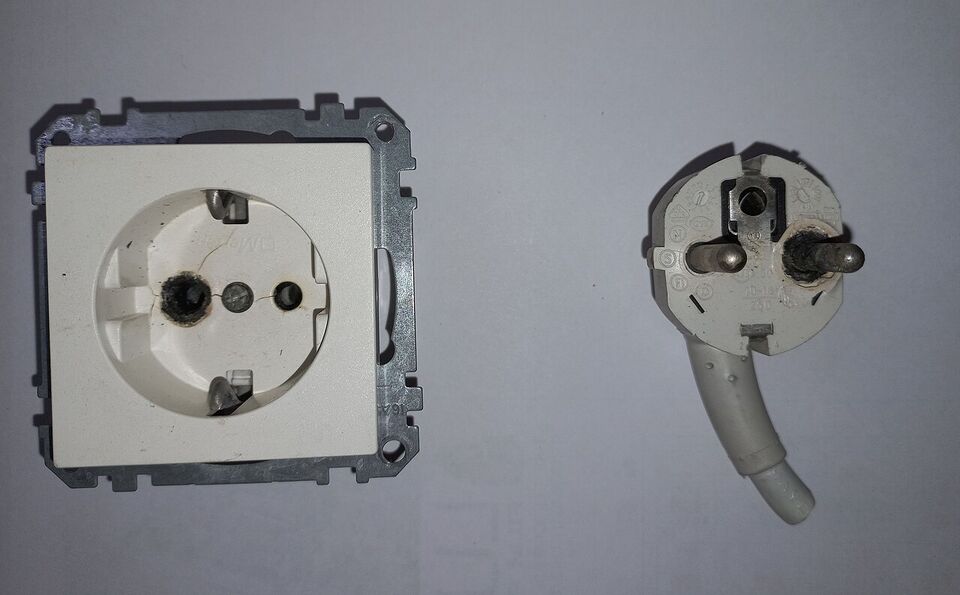
Portugal uses the standard continental European socket, Type F, which has two round holes. Type C plugs (two round pins, ungrounded) also fit it. The plug on a US charger has two flat pins, so it will not go into the socket as it is. You need a plug adapter, a small, cheap piece of plastic that converts the shape. Buy one before you leave; they are easy to find at home and sometimes in Portugal's airports at a higher price.
Many hotels and rentals have only one or two sockets near the bed or desk. A small multi-port adapter or a slim power strip with a European plug lets you charge several devices from one socket. A short extension helps if the only socket is behind the bed.
The voltage
Portugal's mains supply is 230 volts at 50 hertz. US supply is 120 volts at 60 hertz. This difference matters for what you plug in:
- Phones, tablets, laptops, cameras and e-readers. Their chargers almost always say "INPUT: 100-240V, 50/60Hz" on the label. They need only a plug adapter.
- Hair dryers, curling irons, razors and travel kettles. If the label says 120 V only, do not plug it into a 230 V socket, even through an adapter; it may burn out or become dangerous. Use a dual-voltage appliance (look for a voltage switch), buy a cheap one in Portugal, or ask your hotel for a hair dryer.
- Converters versus adapters. An adapter changes the plug shape. A converter or transformer changes the voltage. Most travelers only need adapters. A converter is bulky and needed only for something that is 120 V only, which is rare and best left at home.
Check the label on every device you bring, as we cannot see what you own. When in doubt, leave the appliance behind. For a wider packing list, see Portugal Packing List and Converters for Portugal.
USB charging
USB-A and USB-C charging are widely used in Portugal. Many newer hotel rooms, trains and some airport seats have USB ports. Bring your own cable and a charger with a European-shaped plug or an adapter, and a power bank for long days of sightseeing, since maps and photos drain a phone fast. Check your airline's rules for power banks, which have to travel in carry-on bags.
Maps and offline downloads
A good map is the app you will use most. Before you leave, download offline maps of the areas you will visit: Lisbon, Porto, Sintra and anywhere in the Algarve, Madeira or the Azores. Google Maps and Apple Maps both let you save an area, and a navigation app will still show your location without a data connection, though it may not give live public transit times.
Two practical tips. First, save your hotel and the main transit points as favorites, so you can find them without typing. Second, remember that on steep, cobbled streets such as those in Lisbon, the walking time on a map does not show how steep the road is, so allow extra time when you plan a route. The streets of the Alfama and Bairro Alto are famously steep and narrow. See Lisbon for neighborhood guidance.
Useful apps
CP app
The national rail operator, Comboios de Portugal, has an app and a website (cp.pt) for timetables and tickets. Book long-distance trains early. Check the website and app for current fares and journey times.
Uber and Bolt
Both operate in Lisbon and other cities, under the legal name TVDE. They are useful for late nights and luggage. In Sintra, pickups are reported to be limited to designated zones, so follow the in-app instructions.
Via Verde
The electronic toll system. Rental cars carry a Via Verde device, and the rental company charges you for tolls used, so you do not need an account of your own. See Driving and Tolls in Portugal.
Translation
Download Portuguese in your translation app while on Wi-Fi so it works offline. Learn a few words as well: obrigado (said by a man) or obrigada (said by a woman) for thank you. See Portuguese Phrases.
Maps and transit
Google Maps or Apple Maps with offline areas saved. City transit operators such as Carris and Metro de Lisboa publish timetables and service changes on their sites; strikes happen, so check before long trips.
Banking and tickets
Your bank's app for card controls and a mobile wallet for contactless payments. Keep screenshots of tickets and reservations in case your signal drops. See Money in Portugal.
Calling home and time differences
Portugal's country code is +351. Calls from the US to Portugal start with 011 351, and calls from Portugal to the US start with +1. Free messaging and video apps are the cheapest way to call, on Wi-Fi or a data plan. Check your carrier's rate for any calls that use the mobile network.
The time difference matters when you call home. Mainland Portugal and Madeira use Western European Time, UTC+0 (UTC+1 in summer), which is 5 hours ahead of New York most of the year. The US and the EU change their clocks on different dates, so the gap is 4 hours for about two weeks in March (in 2027, between March 14 and March 28) and again in late October and early November. The Azores are one hour behind Lisbon, so they are 4 hours ahead of New York most of the year. Your phone will switch automatically if automatic time is on; turn it on to avoid missing a train or an alarm.
For emergencies, the number is 112, free from any phone, even without a SIM. Save it. Your hotel may also keep a list of useful local numbers; see Safety in Portugal for details.
How-to: stay connected from the moment you land
- A week before. Check your carrier's international page and decide between a day pass, an international plan and a local eSIM. If you choose an eSIM, check that your phone is unlocked and eSIM-capable.
- The day before. Download offline maps, a Portuguese translation pack, your boarding passes and your hotel confirmations. Charge a power bank. Pack a plug adapter in your carry-on, not your checked bag.
- On the plane. If you are installing an eSIM, do it now if the plane has Wi-Fi, or wait until you land. Leave the phone in airplane mode until the plane lands.
- After landing. Switch off airplane mode. Turn on data roaming for your US SIM if you use a day pass, or set the eSIM as your data line. You should see a welcome text from your carrier. If you do not, restart the phone.
- Test it. Open a map and make sure it finds your location, before you walk away from the terminal. For the airport itself, see Lisbon Airport Transfers.
- At your hotel. Connect to Wi-Fi, and charge your devices with your adapter. If the room has only one socket, use your multi-port adapter.
- Each day. Keep cellular data off for apps that do not need it, and save your downloaded maps for walking days.
When you are ready to book, see Flights to Portugal, and for how to pay once you land, see Money in Portugal.
Add it to a route in the trip builder, or ask us to plan the hotels, trains and guides for you.